Higgsfield in Claude: Katana, campaign variants and approved output
October 16, 2026 update: Katana for repeatable video variants
Zaujaloma AI’s October 15 test provides a fresh use-case signal. The official Katana guide is dated October 12. Through Higgsfield MCP, Katana rebuilds a reference edit using your products or characters and up to five photos. Generation consumes Higgsfield credits, including revisions that require new generations.
For a content team, the useful question is whether reusing an approved format for another product saves time after review and corrections. An impressive first result cannot establish that.
A pilot with one format and three products
I would start with an owned fifteen-second spot and three products from the same range. Prepare approved photos, product IDs and a list of details that must remain accurate: packaging shape, color, logo and offer copy. Confirm that the reference footage and music can be used. This is a proposed pilot, not a Katana benchmark I have run.
Set acceptance criteria before generating: the product must match its photo, the copy must preserve the offer, and the closing shot must leave enough time to read the main message. Record operator time, credits, rejection reasons and correction time for every attempt. The metric is total cost per approved variant, including human review. Produce the same three variants with the current editing process as a baseline.
I would use n8n or Make to track briefs and approvals: new brief → assets ready → awaiting review → approved for export. This does not imply a native Katana connector or a standalone Katana API. For the pilot, I would initiate generation in Claude and manually register the output.
Publishing the advertisement should be separate from producing its file. Reject an inaccurate label or logo, return a specific correction request and cap the budget for another attempt. Automation should shorten routine preparation while keeping the editor’s remaining work visible.
The older sections below document other Higgsfield capabilities over time. Their historical prices and limits are not a current Katana price list.
October 3, 2026 update: Ads Studio for static campaign variants
Zaujaloma AI’s October 2 roundup provided a fresh signal. Higgsfield introduced Ads Studio on October 1: a saved brand kit and product feed static ad creation, with up to 20 variants per run. The documented flow ends with export and upload to an advertising platform. Video ads belong to Marketing Studio.
The useful change is reuse of an approved brand brief. For an ecommerce pilot, I would pick one product and three selling angles: how it is used, its material, and a particular customer need. Produce a small batch with different angles but the same offer and landing page, so the subsequent test has a clear variable.
Treat an imported brand kit as a draft. A website can contain an old price, an outdated benefit, or seasonal copy. Approving colors and logos is insufficient; product facts and advertising claims need review too.
The surrounding content pipeline should record the brand-kit version, product ID, selling angle, output, and reviewer. n8n or Make can manage the queue and audit trail; this is not a claim that Ads Studio provides a documented endpoint for that workflow. Campaign activation and budget require their own approval. Finished creative is neither a running campaign nor evidence of campaign performance. This is a proposed pilot, not a measured result.
September 22, 2026 update: from creative assets to a campaign
Zaujaloma's September 20 demo combines GPT‑6 Astra and Higgsfield for campaign preparation. The useful pattern separates planning and variations from media rendering. A workflow demonstration is not a campaign-performance benchmark.
The official Higgsfield guide, verified as of September 17, describes a Claude route: Higgsfield MCP creates assets while Meta MCP handles research, paused campaign preparation and metrics. The finished video still requires manual upload to Meta Ads Manager in that documented route. This does not establish identical capabilities for every ChatGPT integration or unattended publishing.
I would separate brief, variants, brand and rights review, approved export and distribution. Each asset should carry its brief version and approval status. Activating a campaign or changing its budget must be a separately approved action, not a side effect of rendering.
Budget for standard generation credits through the agent. An “unlimited” period in the web app need not apply to the same work through MCP. This section adds production workflow context to the earlier capabilities and examples below.
Higgsfield added an MCP integration for Claude and other clients that support the Model Context Protocol. In practice, AI image and video generation no longer has to start in a separate app. It can become a capability inside an agent workflow.
This looks like an integration, but the deeper shift is important: the creative tool becomes something the agent can call at the right moment.
What changes
MCP gives an agent a standardized way to talk to external tools. With Higgsfield, Claude can work with a creative workflow: campaign brief, visual variants, storyboard, iteration and outputs.
Instead of copying prompts between chat and a media generator, the agent can keep context and use the generator as one module in the workflow.
Why marketing should care
Marketing does not lack image generators. It loses time switching tools, copying briefs and rebuilding context.
This is useful for quick campaign directions, product-shot variants, storyboard drafts, visual iterations from one brief, and connecting copy, visuals and approval in one thread.
It does not remove the designer or art director. It gives them a faster prototyping table.
What to set first
Creative MCP workflows need brand safety, asset governance and legal review. The agent should know what the brand cannot say or show, where outputs are stored, who approves them and which version can be used publicly.
Update: Supercomputer and Marketing Studio
Higgsfield has moved the story forward. It is no longer only about Claude calling a video tool through MCP. The newer Supercomputer and Marketing Studio layer points toward an agentic creative workspace: you provide a brief, product URL or plain-language request, and the system plans the steps, chooses models, uses presets and delivers finished ad variants.
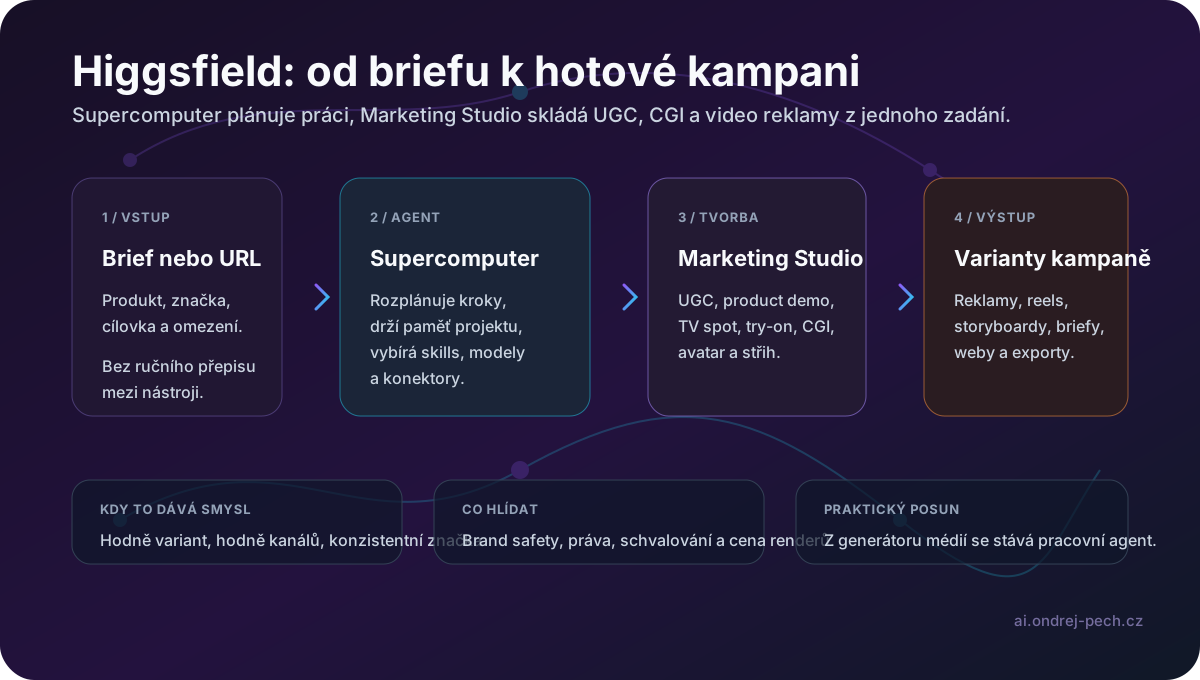
According to the official Supercomputer page, the agent can work with connectors such as Slack, Drive, Notion, Gmail and Figma, use skills as reusable creative workflows, keep project files and memory, schedule recurring tasks and route work across available frontier models. Higgsfield also describes importing memory and skills from Claude, Claude Code, Codex and ChatGPT, which matters for teams that already maintain their workflows inside agents.
Marketing Studio is the more practical marketing layer on top of that direction. It can take a product URL, choose an avatar and format, and generate UGC, product reviews, tutorials, unboxings, virtual try-ons, CGI product shots or a full TV spot. The official description says the video formats are powered by Seedance 2.0 and avatars by Soul 2.0.
For companies, the important shift is the mental model: from “generate me a video” to “prepare a campaign and propose variants.” That is useful for ad prototyping, fast hook testing and creating multiple versions for different channels. I still would not move it straight into production without approval. AI campaigns need brand safety, rights review, factual claim checks, likeness checks and render-cost control.
Update: Higgsfield inside Adobe Premiere Pro and After Effects
Higgsfield now has a dedicated official page for plugins inside Adobe Premiere Pro and After Effects. This is a smaller update than Supercomputer, but it may be more useful in day-to-day production: AI edits move into the place where editors already work.
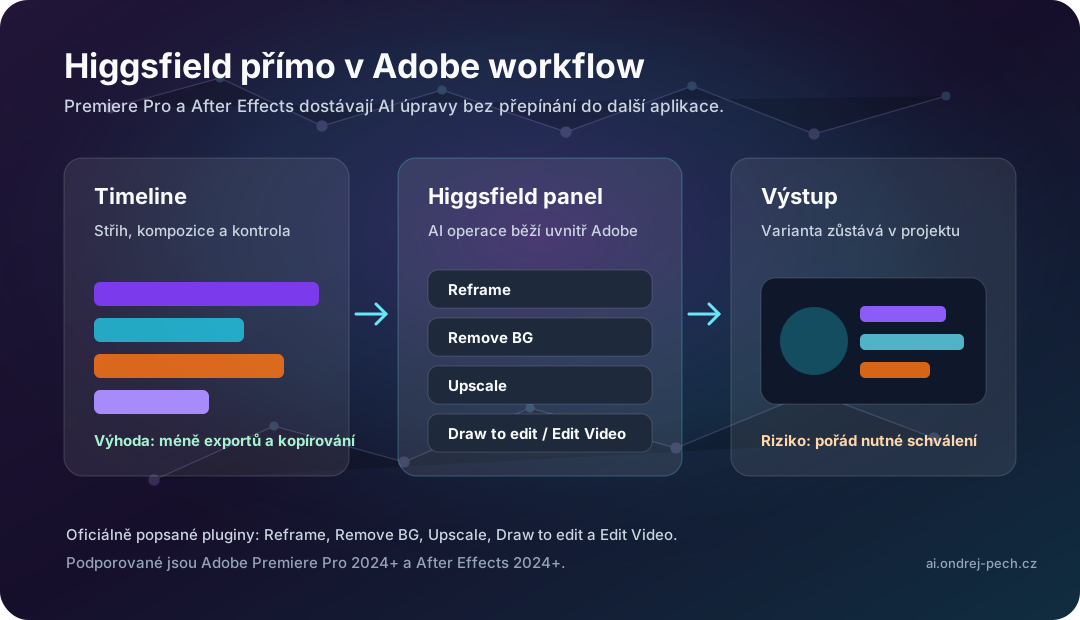
The official page describes five plugins: Reframe, Remove BG, Upscale, Draw to edit and Edit Video. Supported versions are Premiere Pro 2024 and newer and After Effects 2024 and newer; installation uses a ZXP package.
The practical difference is that this is not another generator off to the side. If you need vertical reframing, background removal, upscaling or a quick local edit, having Higgsfield inside the Adobe panel saves exports, context switching and prompt copying.
I would still treat it as a production accelerator, not automatic approval. Ad materials still need rights review, likeness checks, factual claim checks and technical QA before publication.
Update June 22, 2026: Higgsfield inside Adobe Photoshop
As of June 22, 2026, Higgsfield also has a public official page for an Adobe Photoshop plugin. This is no longer just an extension for video editors. It means Higgsfield is moving into mainstream static creative work as well: product mockups, angle variants, background removal, layer decomposition and fast visual generation directly on top of PSD-based workflows.
In practice, this matters for teams producing banners, landing-page visuals, social campaign assets, e-commerce packshots or internal presentation graphics. Instead of the usual loop of “brief in chat -> export to a web AI app -> download -> return to Photoshop,” more of the work can stay inside the Adobe panel.
The official page also shows a broader capability set than the earlier video plugins: Generate AI Image, Realtime AI, Mockup Studio, Layer Decompose, Angles, Shots, plus tools such as Remove Background, Upscale and Character Swap. At the same time, the FAQ on that same official page lists a narrower and partly different set of five tools and describes the product as a native UXP plugin. In other words, the page is a strong product signal, but the exact feature boundary and installation story still look somewhat inconsistent as of June 22, 2026.
That is not a nitpick. For a company or studio, it translates into a simple rule: do not treat the marketing feature list as an operational SLA. First verify which actions are actually stable in your Photoshop version, how quickly layers return into the PSD, what the cloud-processing limits are, and whether the outputs stay usable inside a normal review workflow.
If it works even half as smoothly as Higgsfield promises, this is more important for content pipelines than yet another standalone image generator. It shortens the path from brief to first visual and reduces the number of manual tool switches.
My practical position stays the same as with earlier Higgsfield updates: I would use it as a production accelerator for drafts, variants and internal iteration, not as an automatic final output without human control. For paid campaigns or public claims, facts, brand, rights and technical quality still need explicit review.
September 6, 2026 update: Genjutsu rebuilds selected parts of a clip
Higgsfield launched Genjutsu on August 31. The useful distinction from a conventional text-to-video generator is that it does not start from a blank canvas. It takes an existing shot and rebuilds a selected part of it.
Motion Transfer applies movement from the source video to a different character or rebuilt scene. Object Swap targets a product, item of clothing or another element while attempting to preserve the rest of the shot. According to the official Genjutsu guide, one generation accepts a 4-to-30-second clip, up to 30 reference images and produces up to 1080p output. A full prompt is optional; a preset and short description can drive the workflow.
This is useful for ad variants and creative localisation. A team can shoot one good 15-second performance with the right camera movement and pacing, then change the product, wardrobe or setting for another market. That does not mean everything else will remain perfectly unchanged. I would review faces, hands, logos, text, reflections, shadows and object contact frame by frame.
Pricing makes the right metric clear: measure cost per approved variant, not the price of one render. Higgsfield lists 40 credits (about $2) for a 15-second 480p clip, 104 credits ($5.20) at 720p and 144 credits ($7.20) at 1080p. Ten 1080p variants therefore cost roughly $72 before rerunning failed generations.
In production, I would store the source clip, references, preset, description, resolution, attempt count and approved output as one auditable batch. An agent can prepare variants and name assets, but brand review, likeness and product rights, and technical QA should remain explicit gates. The same applies in n8n or Make: automation can create the job and record metadata, while public publishing waits for approval.
Zaujaloma AI also published a practical test. It is a useful signal; the limits and pricing above come from Higgsfield's first-party page.
September 14, 2026 update: Games 2.0 connects a coding agent to asset generation
Zaujaloma AI demonstrated GPT‑6 Astra connected to Higgsfield. The architecture matters more than the demo itself. In its September 7 first-party guide, Higgsfield describes a split where Astra handles logic, code and orchestration, while Higgsfield generates characters, environments and other visual assets and manages assembly and publishing.
Games 2.0 is not driven by an unconstrained prompt alone. Before generation, the user chooses a game type, visual style, setting and multiplayer mode. The build can then be refined with follow-up instructions, deployed to a link and optionally published in Higgsfield's catalogue. The vendor describes full multiplayer and open-world games from one prompt. That should be treated as a vendor claim, not an independent benchmark of production quality.
The more useful enterprise pattern is specialisation. One agent does not need to generate every part itself; it can orchestrate a specialised generative service and assemble the outputs into an interactive prototype. That can work for rapid training simulations, product demos, campaign microsites or internal concept validation. It is much less convincing as a replacement for maintainable software without code, licensing and operational review.
I would add four gates before real deployment: automated tests for game logic, provenance and rights checks for generated assets, security review of network and publishing functions, and human approval before a public release. Store the prompt, selected parameters, model version, asset inventory, iteration count and approved-build link. n8n or Make can prepare the brief and archive outputs, but publishing should remain a separate auditable step.
Zaujaloma AI published the practical demonstration. It is the discovery signal; the architecture and availability details above come from Higgsfield's first-party guide.
Conclusion
Higgsfield via MCP is not just another video generation button. It shows where agent workflows are heading: the agent keeps the context and calls specialized creative tools as modules.
The practical value is a shorter path from brief to usable visual direction. The risk is the same as always: easier generation makes approval, audit and clear rules more important.
Sources: Higgsfield MCP, Anthropic: Model Context Protocol, Claude MCP documentation, Zaujaloma AI, Higgsfield Supercomputer, Higgsfield Marketing Studio, Zaujalo ma: A whole marketing campaign from one prompt, Higgsfield Plugins for Adobe Premiere Pro & After Effects, Zaujalo ma: Higgsfield in Adobe Premiere and After Effects, Higgsfield Plugins for Adobe Photoshop, Zaujaloma AI: Higgsfield is in Adobe Photoshop! Create pro visuals with AI.