Local AI agents: Ollama in Claude Code and Codex, data and limits
September 24, 2026 update: bring your own model through Ollama
Filip Oborník’s September 23 video illustrates a useful separation: the agent application and the model provider need not be the same choice. I checked the terminal setup against documentation. The video date does not establish when the integration first shipped.
Ollama connects Claude Code through an Anthropic-compatible API. Its Codex CLI integration uses a dedicated profile and model catalog. With Ollama and the relevant CLI installed, choose one:
ollama launch claude
ollama launch codex
Check the selected model and where inference runs. Ollama also offers cloud models, so the command alone proves nothing about locality. OpenAI documents custom model providers and Ollama as an OSS provider.
Both integrations recommend at least 64k context. Your hardware still has to support it. The Ollama FAQ explains how ollama ps shows GPU, CPU or mixed execution. A working chat is not evidence of reliable tool use or file editing.
Trial it on an internal repository
Start with an isolated copy of an invoice parser and anonymous test inputs. Ask the agent to fix one specific bug, run tests and return a diff. It should have no accounting credentials or permission to send documents.
Record the model, quantization, context, elapsed time, repair attempts and test results. Watch for repeated work as well as failing tests. Stop loops that do not improve the result; cheap inference can still consume expensive review time.
For sensitive data, inspect the complete path: model endpoint, MCP services, search, network tools and cloud fallback. Enforce network boundaries outside the prompt. Local inference cannot stop a separate tool from uploading a document.
This integration makes model switching and hardware pilots easier. It does not replace a company gateway with access management, budgets and auditing. The earlier case studies remain below; their measurements and prices belong to the dates shown.
September 2, 2026 update: local AI is primarily a data-boundary decision, not a cheap-token trick
A new practical test by Jirka Herník moves this article beyond a coding benchmark and towards a question I encounter more often in companies: what should you do when an agent needs invoices, email, bank exports or internal documents that you do not want to send to a general-purpose cloud chat?
The test ran a four-bit Qwen3.8‑27B on an RTX 3090 with 24 GB of VRAM. Using Unsloth Studio and OpenCode, the local model processed a CSV of payment history and built an HTML dashboard. It kept running after the internet connection was disconnected. That is useful evidence that the workflow is feasible, but it is not a universal benchmark: it is one machine, one task and one configuration.
Removing a name is not anonymisation
Start by separating three different strategies:
- Anonymisation aims to make identification by reasonably likely means impossible. Removing a name is not enough when a combination of city, profession, age and unusual behaviour can still single someone out.
- Pseudonymisation replaces an identifier with something such as a customer number while keeping the mapping table separate. The EDPB is clear that pseudonymised data is still personal data and remains subject to the GDPR.
- Local processing keeps the prompt, documents and inference on your own device. LM Studio says that locally run models do not transmit messages, histories or documents from the device; the app can operate offline once model files have been downloaded.
These approaches can be combined. An n8n workflow can replace national identifiers with internal IDs before local extraction, let the model produce structured JSON and send only an approved summary to the CRM. Pseudonymisation alone does not make cloud processing anonymous or risk-free.
There are three environments, not two
The practical choice is not simply cloud versus your own computer:
- Owned hardware keeps data and inference inside your boundary. It makes sense for sensitive documents, repeated extraction, internal search or disconnected operation.
- An API is easiest to deploy and scale. For sensitive data you still need to assess the provider, region, retention, contracts and the tools the agent is allowed to call.
- A rented GPU may be cheaper than buying hardware, but it is not local. Data leaves your infrastructure and the security model resembles cloud processing.
A local app does not automatically create a local workflow. Web search, cloud fallbacks, telemetry or remote MCP servers can still move data outside the boundary. For truly sensitive runs, enforce egress rules, disable unnecessary tools and log every external destination.
Performance does not fit into one number
The official Qwen model card lists 27 billion parameters, a native 262,144-token context, extension up to one million tokens and an Apache 2.0 licence. That does not mean every 24 GB GPU can run every configuration comfortably. Quantised weights, KV cache, context and inference overhead must all fit in memory.
In the earlier test, the four-bit model fitted on a 24 GB RTX 3090, but a long agent loop lost its intermediate state and repeated completed work. The new test exposed the same boundary differently: at extra-high reasoning the model looped over number formatting, exhausted its context and triggered compaction. Persistent task state, acceptance tests and stop conditions therefore matter as much as model size.
When does a GPU pay for itself?
In the video, cloud-hosted GLM‑5.3‑Flash built the same dashboard for roughly CZK 0.20. Treat that as one case-study measurement, not a price list. OpenRouter currently lists a promotional price of USD 0.075 per million input tokens and USD 0.25 per million output tokens; that can change.
If you buy a GPU only to save a few cents on an occasional workflow, the payback will be poor. Local operation is usually justified by a different combination:
- data must not leave the device or corporate network,
- the workflow runs frequently and at stable volume,
- latency must be low and predictable,
- internet access or an external API cannot be assumed,
- the hardware serves several processes rather than one occasional agent.
Include hardware, electricity, cooling, administration, failure handling, human review and fallback in the calculation. The useful metric is not token price or tokens per second but cost per accepted result.
How I would deploy it
For invoices, email or CRM enrichment, start with a small pilot:
- List which fields are sensitive and which may cross the boundary.
- Prepare 50–100 representative documents, including exceptions.
- Serve the local model through LM Studio or Unsloth Studio behind an OpenAI-compatible API.
- Require structured JSON, validate the schema and store an audit trail.
- Route low-confidence or expensive exceptions to a human; use a cloud fallback only for fields that are allowed to leave.
- Compare cost, latency and error rate per completed and accepted case.
Local AI is therefore neither automatically cheaper nor automatically secure. It is a different operational boundary. Combined with restricted tools, network controls, persistent state and measurable acceptance tests, it can be a very practical fit for sensitive business workflows.
Source for the new case study: Jirka Herník – How to run AI on your own computer.
Update, 21 August 2026: the stronger local model hit a context problem, not a syntax problem
Jirka Herník repeated the Tetris test on a substantially stronger setup: Qwen3.8‑27B in Q4_K_M quantization, an RTX 3090 with 24 GB of VRAM, LM Studio and opencode. On that specific setup, he reported roughly 800 input-processing tokens per second and 40 output tokens per second for the 17.74 GB model. This is a useful real-world case study, not a universal benchmark.
The failure mode matters more than the speed. According to the test, the agent kept rebuilding Tetris because LM Studio was using the truncateMiddle context-overflow policy. That policy preserves the system prompt and the first user message while dropping messages from the middle. The model could therefore retain the original assignment but lose the record that the application already existed and that the next step was verification.
This matches LM Studio’s official documentation, which exposes three overflow behaviours: stop generation at the limit (stopAtLimit), remove the middle of the conversation (truncateMiddle), or maintain a rolling window (rollingWindow). None of these options makes a long-running agent reliable on its own. You need to know which history can disappear and persist operational state outside the chat.
The official Qwen3.8‑27B model card lists 27 billion parameters, a native 262,144-token context and extension up to one million tokens. That is not the same as the usable context of a local quantized deployment on a particular GPU. VRAM, server configuration, KV cache and agent tools all affect the limit that actually runs.
What to configure in a production workflow
- Set context length and overflow policy deliberately; do not inherit defaults blindly.
- Persist the plan, completed steps and open failures in the repository or a structured task state, not only in conversation history.
- Add a stop condition: if the agent keeps touching the same files without improving tests, stop the loop and escalate.
- Measure cost per completed task, including retries and human review, rather than only tokens per second or model price.
- Start local agents on isolated tasks with automated acceptance tests and a cloud or human fallback.
The new test does not change the article’s conclusion to “local models have replaced the cloud”. It sharpens it: the model is only one component of the agent system. A faster GPU and newer weights help, but without persistent state, correct context handling and verification, they may only let you repeat the same mistake faster.
Case-study source: Jirka Herník – I cloned myself 10 times, AI Mastermind 36.
On 16 May 2026, Jirka Herník ran the kind of test that is often more useful than another abstract benchmark table: six local models, one cloud baseline, and the same task for all of them. Write Tetris as a single HTML file.
The test ran on a powerful but still realistic home workstation: Ryzen 9 5950X, RTX 3070 with 8 GB VRAM, 128 GB RAM and LM Studio as the local server. The workflow used opencode as the coding agent, Playwright MCP for browser checks, and GPT-5.5 through OpenRouter as the reference cloud result.
Why this is a useful test
Tetris is not an enterprise app, but it is a better test than another TODO list. The model has to keep game state, rotations, collisions, rendering, timing, keyboard input and JavaScript errors under control. When the output must run as one HTML file, there is not much room to hide broken architecture.
Where the small models failed
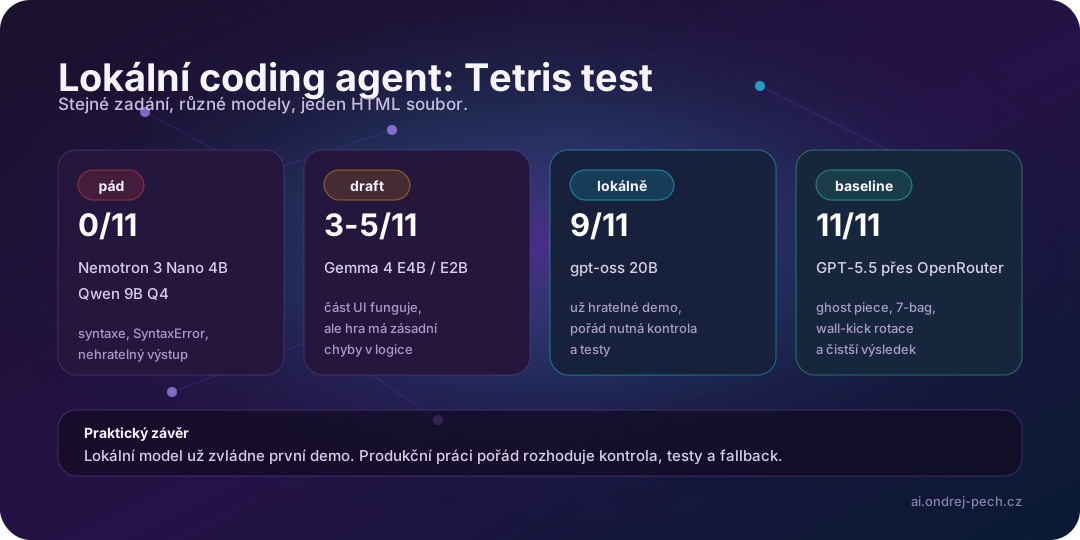
The smallest models hit the wall quickly. According to the video, Nemotron 3 Nano 4B returned Python-like syntax inside JavaScript and ended at 0/11. Qwen 9B Q4 failed on a SyntaxError and also ended at 0/11.
That does not mean those models are useless. It means “local AI” is not one category. A model that works well in chat or on simple extraction tasks may still be a poor fit for a coding agent that has to create a functional interactive app.
Where local starts to become practical
The middle of the test is more interesting. Gemma 4 E4B reached 3/11 and Gemma 4 E2B reached 5/11, although the active block was invisible. That sounds funny, but it matters in practice: a local model may already be useful for drafts, small edits, simple refactors, code explanation, or first-pass implementation.
The standout local result was gpt-oss 20B. It reached 9/11 and produced an actually playable game. That is the point where a local model stops being only a toy. I still would not let it touch production code without review, but as a cheap first iteration layer it starts to make real sense.
Why the cloud baseline still won
GPT-5.5 through OpenRouter reached 11/11: ghost piece, 7-bag randomizer and wall-kick rotation. That is the difference between “it kind of runs” and “it understands the small application as a whole”.
The practical rule is simple: local models can be the cheap first layer, but hard cases, final review and more complex architecture still belong to a stronger model. Not because the cloud is magic, but because coding agents live or die by how many rules and edge cases they can keep in their head at once.
How I would use it in a workflow
I would use a local model today for:
- simple boilerplate,
- explaining unfamiliar code,
- a first draft of a small function,
- quick refactors without sensitive data,
- preprocessing work before a more expensive model.
I would keep a stronger model or cloud baseline for:
- architecture decisions,
- difficult bug fixes,
- tests and edge cases,
- final review,
- any situation where the cost of a mistake is higher than the cost of tokens.
Bottom line
This test is not about local AI losing. It shows that local AI is finally becoming practical, as long as it is placed correctly inside the workflow.
An RTX 3070 with 8 GB VRAM is still not a replacement for a frontier model. But it is already enough for a local agent to do the first chunk of work cheaply and without sending everything to the cloud. Production value does not come from one model writing Tetris. It comes from routing, tests, fallback and a human who can tell the difference between a playable demo and reliable software.
Sources: Jirka Herník: Tetris od 6 lokálních AI, LM Studio, opencode, Playwright MCP, OpenRouter, OpenAI: gpt-oss, Google Gemma, Qwen, NVIDIA Nemotron.