Microsoft Scout: the first Autopilot agent for Microsoft 365

Microsoft introduced Microsoft Scout on June 2, 2026 as the first agent in a new category it calls Autopilots. This is not another chat sidebar. Scout is meant to keep running, carry its own identity, preserve work context and move tasks forward inside Microsoft 365.
Short version: Scout matters because it targets the place where today’s Copilot often stops too early. It answers, summarizes, or suggests. Scout is supposed to continue with the next steps: watch your calendar, prepare material, block time, coordinate meetings, work with files, use a browser and in some cases run local tools. It is still a Frontier preview, so I would not put it into a company without strict permissions.
What Microsoft announced
Microsoft describes Autopilots as always-on agents that work in the background, operate with their own identity and act within the permissions and policies set by the organization. Scout is the first such agent.
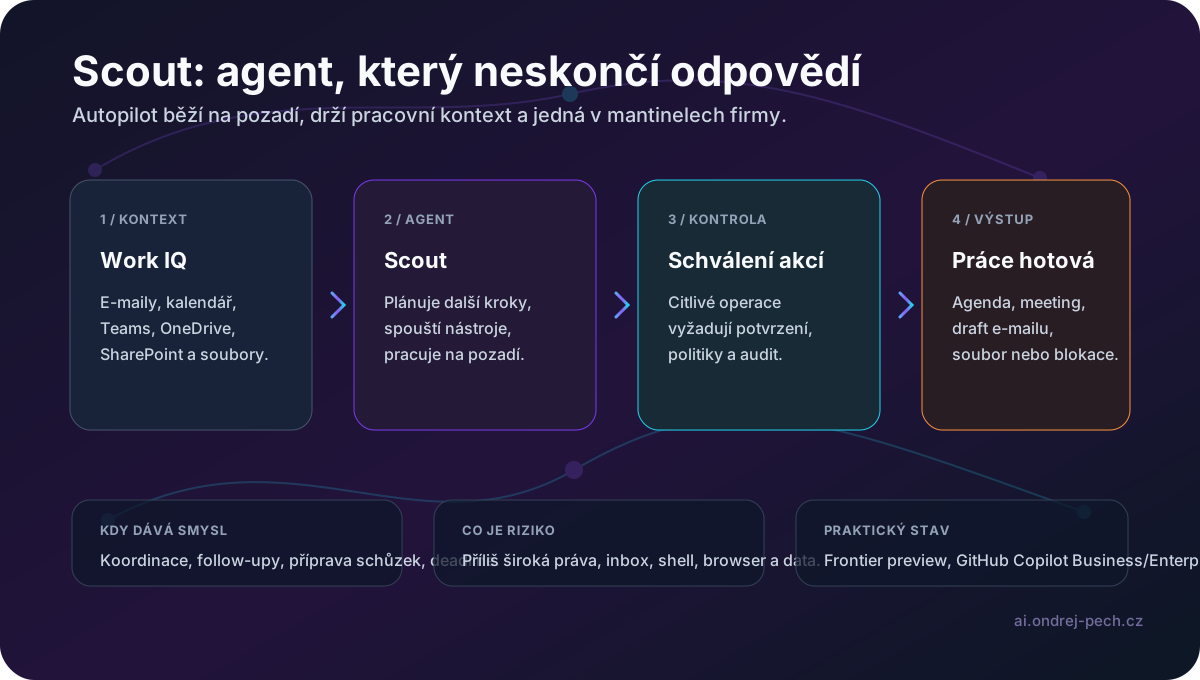
Microsoft says it connects to Teams, Outlook, OneDrive, SharePoint, email, calendar, contacts and a desktop app. Through the desktop app it can also reach the browser, local resources and MCP servers. Microsoft Learn describes Scout as a Windows and macOS desktop app that can read and write files, run shell commands, automate a browser through Playwright, query Microsoft 365 data and work autonomously in the background.
That is the real difference from a normal Copilot chat. This is a work loop: plan, action, control, result.
What it can do
The practical scenarios Microsoft gives are straightforward:
- coordinate meetings across time zones,
- flag important meetings and prepare materials,
- identify upcoming deliverables and block calendar time,
- detect stalled decisions,
- work with files in a local workspace,
- automate web apps through browser automation,
- run scripts, builds or tests through a shell,
- delegate parts of complex work to specialized subagents.
This is close to what coding agents do today, moved into the Microsoft 365 work environment. If it works reliably, the value is not that Scout writes a nicer email. The value is keeping work moving while the user switches between meetings, inbox, documents and projects.
Why OpenClaw matters
Microsoft says Scout is powered by the open-source OpenClaw technology. It is also contributing policy conformance upstream to OpenClaw, so organizations can check whether an environment meets security and compliance requirements and produce an audit-ready answer.
That is the important enterprise signal. Microsoft is trying to take an agentic model that runs outside ordinary chat and place it inside enterprise control: Entra identity, permissions, Purview policies, DLP, sensitivity labels and approval for sensitive actions.
How to set it up
According to Microsoft Learn, this is a preview. Access requires the Frontier preview program, an active Microsoft 365 license, GitHub Copilot Business or Enterprise, Windows 11 or macOS 12+, local admin rights and IT access setup.
The basic path is:
- The organization joins Frontier and accepts preview terms.
- IT configures access and required Intune policies.
- The user installs the Scout desktop app.
- The user signs in with Microsoft 365 and GitHub with a Copilot license.
- The user selects a workspace directory.
- Permissions are configured for files, shell, browser and Microsoft 365.
The key default is that auto-approve should be off. Sensitive actions such as sending email, sharing, replying, forwarding or changes visible to others should require confirmation.
Where I would use it
Scout makes sense in companies that already live in Microsoft 365 and where the main problem is coordination, not text generation.
I would test it for:
- daily preparation: what is coming, what is missing, where risks are,
- meeting prep: agenda, recent emails, relevant documents,
- follow-up after meetings: tasks, calendar blocks, draft messages,
- personal project management: deadlines, dependencies and stuck decisions,
- document and approval administration.
I would be careful with email, shell and browser automation. Those are exactly the places where an agent with too much authority can do damage faster than a human.
July 1, 2026 update: OpenClaw skills as supply-chain risk
The latest OpenClaw signal is not another big feature. It is a security warning. TechRadar, citing researchers from Palo Alto Networks Unit 42, reported several malicious skills on ClawHub, the official marketplace for OpenClaw. According to that report, the set included macOS infostealers and fraudulent automations that initially passed the existing checks and were removed later.
I could not find the primary public Unit 42 report during this run, so I would not treat the secondary report as a complete forensic source. But the operational pattern is clear enough: an agent skill is not a harmless editor plugin. It can receive context, invoke tools, read files, use the browser, or operate through messaging channels. Installing such a skill from a marketplace without review adds a new supply-chain layer to the company environment.
OpenClaw's own documentation points in the same direction. It describes the product as a personal-assistant trust model with one trusted operator boundary, not as hostile multi-tenant isolation. It recommends splitting gateways by trust boundary, auditing configuration, keeping tool permissions minimal, and treating plugins and skills as part of the security review.
For Scout and similar enterprise agents, the practical rule is simple: do not pilot only whether the agent can schedule a meeting. Pilot extension control too. Allow only approved skills, pin versions where possible, review source code, keep shell/browser/email actions out of auto-approve, and log which skill triggered which action. I would treat this the same way in n8n, Make, or internal agents as I treat npm packages: an approved component catalog, reviewed changes, separate accounts, and a clear rollback path.
What I would control in a pilot
The main question is not whether Scout looks useful. It does. The question is how tightly it is constrained.
Minimum pilot setup:
- a separate pilot group, not a broad rollout,
- a clear workspace directory,
- shell commands set to prompt or deny, not automatic,
- email and Teams actions always requiring approval,
- audit logs for every sensitive action,
- no highly sensitive data in the first phase,
- regular review of mistakes and unexpected actions.
In other words: treat Scout as a new digital colleague with a limited badge, not as an invisible process with access to everything.
Verdict
Microsoft Scout is one of the more important agentic AI moves for normal office work. Not because it already replaces an assistant, project manager or analyst. The direction matters: an agent with its own identity, background operation, work context and enterprise policies.
If Microsoft gets security, audit and permissions right, Scout could become the first practical version of “an AI assistant that works for you” in companies. If it does not, it will quickly become another reason for companies not to trust agents.
For now it is a preview. That is exactly how I would treat it: test it, measure it, restrict it and look mainly at how much coordination disappears from the calendar and inbox.
Sources
- Microsoft 365 Blog: Introducing Microsoft Scout
- Microsoft Learn: Microsoft Scout overview
- Microsoft Learn: Get started with Microsoft Scout
- Microsoft Learn: Responsible AI overview for Microsoft Scout
- Marek Bartoš: Microsoft Scout short
- TechRadar: Multiple malicious OpenClaw skills found online
- OpenClaw GitHub repository
- OpenClaw security documentation
- OpenClaw skills documentation
- Marek Bartoš: OpenClaw mobile app and AI agent security risks